Musician Log

Keep videos, PDFs and links inside the snippet, not in ten tabs

A snippet holds everything you need to practice it: the video, the sheet music, the backing track and your notes. For guitar, bass, piano, vocals, horns, strings and drums alike, you never have to leave your own space to find them.

Sheet music, PDFs and images

Add a photo of a page, a scan or a PDF as notation, and it sits on the snippet where you can open it full size. Add an audio file or an audio link for a backing track or a recording of yourself.

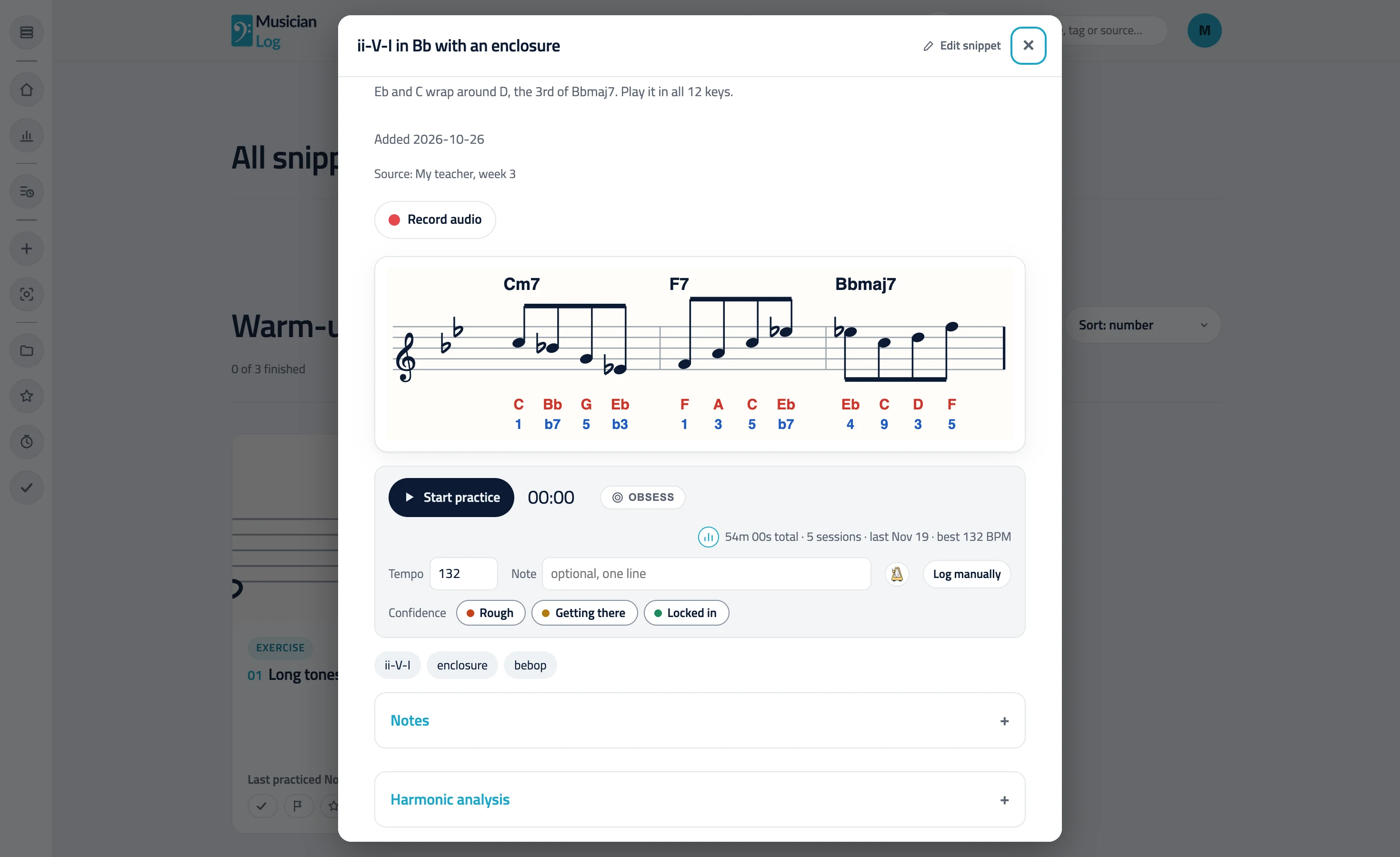
An open snippet: a line over Cm7, F7 and Bbmaj7 with note names and scale degrees, the practice timer, tempo and confidence

Paste a video link and it plays right there

Paste a YouTube, Instagram, Facebook, Vimeo, TikTok, Drive or OneDrive video link and it plays on the snippet, next to the notation. YouTube playlists and Shorts work too. A link that is not recognized is still saved and opens in a small window.

Loop and slow down a YouTube passage

Set A and B around a passage under a YouTube video, turn on Loop, and it jumps back to A each time it reaches B. Nudge either end by a second. Slow it to 75% or 50% speed (25% when YouTube offers it), and your loop and speed are remembered for that video.

Your own short clips

Record a short clip of a passage on your phone and add it as an MP4, WebM or MOV file. It plays on the snippet like any other video, so your teacher’s demonstration or your own take is always one tap away.

Links to anything else

Add a plain link for an article, a tab site, a lyric sheet or a teacher’s web page. Together with your notes, tags and source, the snippet becomes the one place to look.

Questions, answered.

Can I loop part of a YouTube video and slow it down?

Yes. Under a YouTube video in a snippet, set A and B, turn on Loop and pick 75% or 50% speed (25% too when YouTube offers it). The loop and speed controls are for YouTube videos; other video sites play as usual.

Which video sites work?

YouTube (videos, Shorts, live replays and playlists), Instagram reels and posts, Facebook videos and reels, Vimeo, TikTok, Drive and OneDrive play inside the snippet. Other video links are saved and open in a small window.

Can I add my own files?

Yes. You can add images, PDFs, audio and short clips as uploads. Uploads are a Pro feature, and the free plan keeps to text and two video links.

Do I need to download anything?

No. Everything plays in the browser, on your phone or your laptop.

Is it private?

Yes. Your snippets and what you attach to them are visible only to your own account, unless you share a section with a link.

Practice one snippet at a time.

Start building